16 December 2025
FLY THE LINE: SHORT HAUL EDITION
Today we're turning our focus to the achievements of one of our development partners over the last 12 months, as well as giving an insight into what updates we're expecting to see in their software in 2026.
PulsarSim - the developer behind the successful
Fly the Line: Short Haul Edition - released their first product in July 2025. If you are not familiar with it, Fly the Line is a brand-new career-driven experience with a unique take on the typical flight simulation career mode experience. Rather than simply tracking your flights from point A to point B, Fly the Line incorporates lifestyle management simulation that takes place between flights. Once you have begun your journey, either with your favourite real-world airline or your own fictitious one, you will earn cash and XP that you can use to climb the ranks from Junior First Officer to Fleet Captain.
Fly the Line generates a schedule of flights for you to fly, built from a database of real-world airline flights, or based on a user-created database that has to be meticulously hand-crafted via the in-app options. All flights can be flown in any fixed-wing General Aviation aircraft or passenger jet in your hangar in MSFS, X-Plane or even FSX/P3D. That is what sets Fly the Line apart from other career mode experiences – it offers so many options to customise the career-mode experience to your personal tastes.
(You can click on the screenshots below to see an expanded image.)
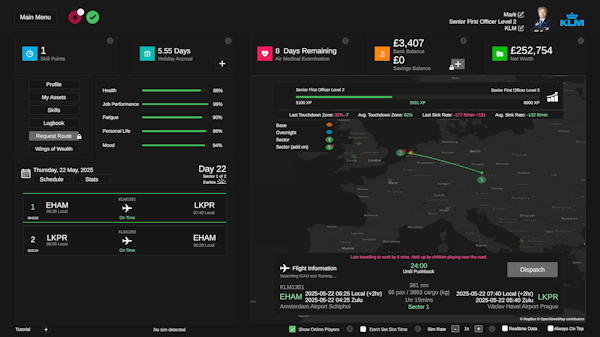
Fly the Line has continued to grow a community of dedicated users. Starting shortly after its release, we opened a Fly the Line Discord server where users can ask questions, make feature requests, interact with the development team and even get ‘Early Access’ versions of the latest updates before they are published. We kindly invite you to join the
Fly the Line Discord community if that sounds like something you would be interested in being a part of.
In August we published the first update to the product, which featured a significant changelog. This was an important update for us, as well as for the development team, as it was our first opportunity to act on the community feedback that had been received since the initial release. Although we had previously relied on tester feedback in the pre-release phase of Fly the Line, that only represents a very small cross-section of the community, so getting a product released and hearing the feedback from the wider user base is always a pivotal moment in any product’s development.
In that initial v1.0.388 update, the focus was on bug fixes and quality-of-life additions that opened doors for users to experience the Fly the Line in ways not originally foreseen by the development team. One key area of the product that changed based on user feedback was the schedule generation and flight tracking for small aircraft. We had envisioned that a substantial percentage of Fly the Line users would be flying typical airline routes using narrow-body airliners, but feedback requesting improved support for smaller, General Aviation type aircraft led the development team to better support this with significant changes to the schedule generation logic.
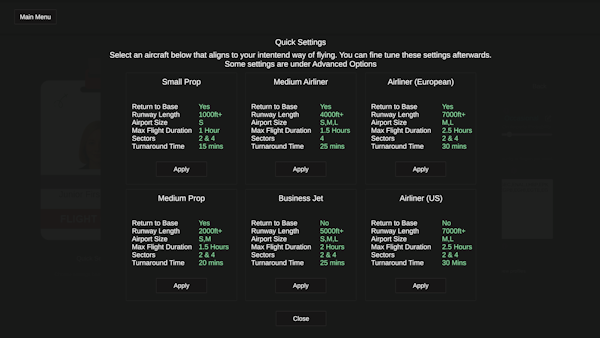
A further large update (v1.0.413) in November mainly focused on adding features requested by the community. Among them were an option to disable Fly the Line’s ability to force the simulator time, a new moving map that shows the position of other Fly the Line users, and a ‘Return to Base’ toggle option that lets users choose whether their schedule would always have them return to the same base at the end of a shift (similar to European airlines), or have the schedule end the day at any airport in the route map (similar to low cost USA airlines). These new features, along with further improvements to schedule generation, were well received by Fly the Line users.
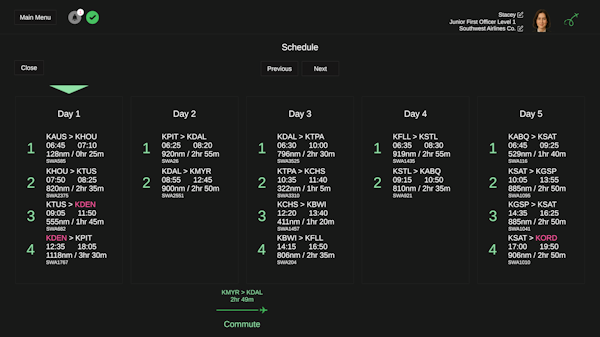
With a solid base to build upon, the development team has now shifted focus to bring further new additions to Fly the Line in the year ahead. The next update is in the latter stages of development, and we expect it to make its way to our internal testing team in early January, with a full release planned for Q1 2026 (the exact timing will depend on testing feedback). The headlining item in this upcoming update will be the Schedule Manager; this brand-new addition will allow users to edit, create and share schedules with other community members, all housed within the Fly the Line app.
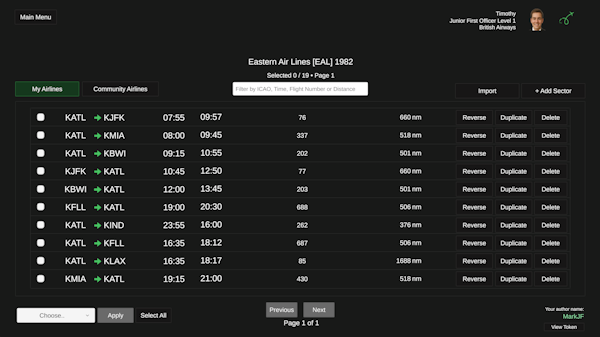
Do you want to fly for an airline using the latest Winter 2025 timetable, but the data isn’t included in the core Fly the Line database? That’s not a problem; Schedule Manager will allow you to create that exact schedule within the Fly the Line app. You can either create it from scratch or use the existing Fly the Line database as a starting point. Departure times, arrival times and flight numbers are all customisable.
Do you know a friend that owns a 1980s timetable for your favourite airline? They could create a schedule using that data within the Schedule Manager and share it with the community. Like any good friend, you might also wish to give a rating to that schedule as a recommendation to other users!
Once a custom schedule is created or downloaded, Fly the Line will use that data when generating your weekly schedule, thus seamlessly integrating with the existing gameplay mechanics.
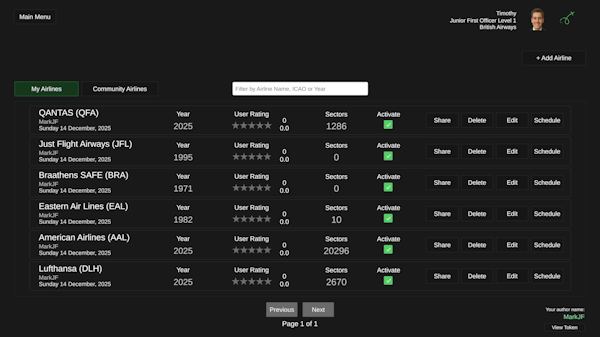
Schedule Manager opens the door to a huge new dimension for Fly the Line - a career-driven experience which can use any accurate, custom-made airline schedule from any airline or era. We are excited to see where the community will take this feature, and how that will alter the course of future Fly the Line features.
The screenshots in this article show the Schedule Manager in the latest development build of Fly the Line. Please note that this build is still work in progress, and changes are likely to occur ahead of the next release.
We will be sure to share further news regarding
Fly the Line here and on our social media channels.
Tomorrow, Part 3 of our End of Year Round Up will take a look at one of the airliners currently being developed by our in-house team.